Introduction
Manufacturing is changing rapidly because of digital technologies, automation, and smart production systems. Industry 4.0 is transforming how companies design products, operate machines, and manage production processes. In this transformation, CAD in Industry 4.0 plays an important role by helping engineers create accurate digital models before manufacturing begins.
Computer-Aided Design (CAD) allows engineers to develop 2D drawings and 3D models using specialized software. Moreover, modern CAD tools connect with technologies such as Computer-Aided Manufacturing (CAM), simulation, digital twins, and product lifecycle management. As a result, manufacturers can improve product quality, reduce design errors, and speed up product development.
In this blog, we will explore how CAD supports Industry 4.0, its major applications, benefits, and career opportunities for engineering students.
What Is Industry 4.0?
Industry 4.0 refers to the fourth industrial revolution, in which digital technologies connect machines, software, products, and people. Instead of relying only on traditional manufacturing methods, smart factories use connected systems to improve productivity and decision-making.
Key technologies used in Industry 4.0 include:
- Internet of Things (IoT): Connects machines and devices to collect and share data.
- Artificial Intelligence (AI): Helps analyse information and support better decisions.
- Robotics and automation: Improve production speed and consistency.
- Cloud computing: Allows teams to access and share design and production data.
- Digital twins: Create virtual representations of physical products or systems.
- CAD and CAM: Support product design, manufacturing planning, and machining.
Together, these technologies help manufacturers develop products more efficiently. CAD provides the digital design foundation for many of these processes.
What Is the Role of CAD in Industry 4.0?
CAD software enables engineers to design components, assemblies, tools, and machines in a digital environment. However, its role extends beyond creating drawings.
In Industry 4.0, CAD data can become part of a connected product development process. Engineers can share 3D models with manufacturing teams, use designs for simulation, and transfer suitable geometry into CAM software for toolpath generation.
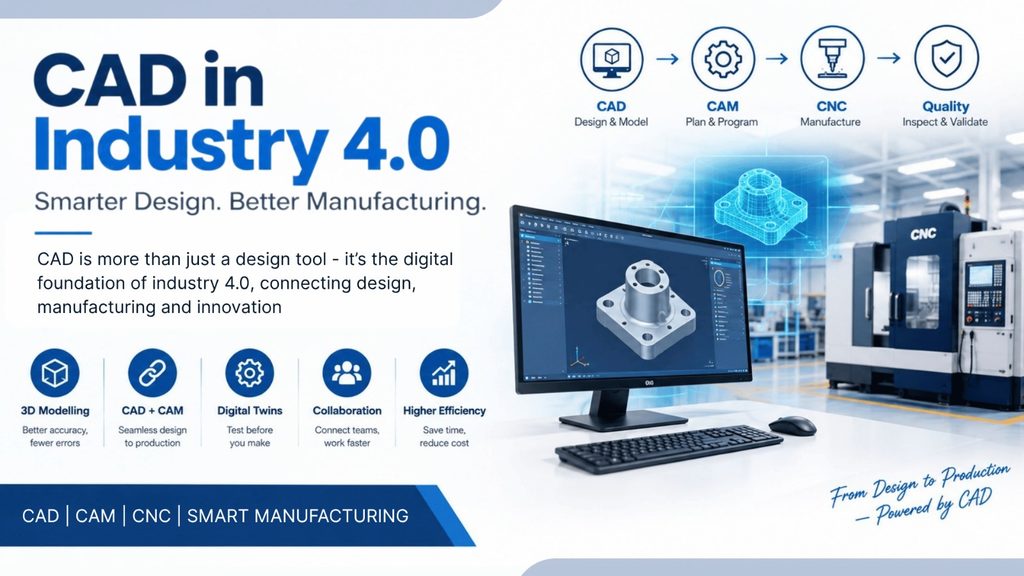
For example, an engineer can design a machine component in 3D CAD software. Next, the manufacturing team can use the model to plan machining operations in CAM software. Finally, the component can be produced using a CNC machine and inspected against its design specifications.
Therefore, CAD helps connect product design with manufacturing and quality control.
7 Ways CAD Supports Industry 4.0
1. 3D Modelling and Digital Product Development
Modern CAD software allows engineers to create detailed 3D models of components before producing physical prototypes.
Furthermore, these models help teams examine dimensions, fit, clearances, and assembly relationships. Consequently, engineers can identify design problems earlier and reduce unnecessary rework.
For example, a mechanical engineer can model a VMC fixture, check the position of its clamping components, and make changes before manufacturing begins.
2. Integration with CAM and CNC Machining
CAD and CAM work together to connect product design with actual manufacturing.
First, engineers create a component model in CAD software. Then, CAM software uses the relevant geometry to plan machining operations and generate toolpaths. After verification and post-processing, the appropriate CNC program can be transferred to a compatible machine.
This workflow is useful for:
- CNC milling and turning
- VMC component manufacturing
- Tool and die design
- Complex surface machining
- Multi-axis machining
As a result, CAD/CAM integration helps reduce manual data entry and improves consistency between the design and the manufactured component.
3. Digital Twins and Virtual Testing
A digital twin is a digital representation of a physical product, machine, or process. Depending on the system, it may use design data, operating information, and sensor readings to reflect the condition or behaviour of its physical counterpart.
CAD models can provide the geometric foundation for a digital twin. In addition, simulation tools can help engineers study how a product may perform under different conditions.
For example, a manufacturer can use a 3D model of a machine component to investigate potential interference, movement, or structural behaviour before producing the physical part.
However, a CAD model alone is not a complete digital twin. Additional data and suitable software are often required.
4. Faster Design Changes and Collaboration
Industry 4.0 encourages collaboration between design, manufacturing, quality, and service teams.
With connected design systems and product data management tools, engineers can share updated models and drawings with authorized team members. Moreover, version control can help teams identify the latest approved design.
Consequently, manufacturers can reduce confusion caused by outdated drawings and improve coordination between departments.
5. Simulation and Design Validation
Modern CAD environments may include or connect with simulation tools that help engineers evaluate product behaviour before manufacturing.
Depending on the software, engineers can examine:
- Structural strength and deformation
- Assembly fit and interference
- Motion and mechanism behaviour
- Thermal effects
- Fluid flow
Therefore, virtual testing can help identify possible problems before expensive physical testing or production takes place. Nevertheless, simulation results depend on correct material properties, boundary conditions, and engineering assumptions.
6. Customisation and Smart Manufacturing
Manufacturers increasingly need to produce components that meet specific customer requirements.
CAD makes it easier to modify dimensions, shapes, and assemblies without redesigning an entire product from scratch. Furthermore, parametric modelling allows engineers to update related features when selected design parameters change.
For instance, an engineer can modify the dimensions of a fixture for a different workpiece. The updated model can then support manufacturing planning and the preparation of revised machining operations.
As a result, CAD supports flexible production and product customisation.
7. Product Lifecycle Management (PLM)
Product Lifecycle Management involves managing product information throughout its lifecycle, from initial design to manufacturing, maintenance, and eventual retirement.
CAD models and drawings can be managed through PLM systems alongside bills of materials, revisions, specifications, and engineering documents.
In addition, this approach helps teams maintain traceability and coordinate engineering changes. Consequently, companies can manage complex products more effectively.
Popular CAD Software Used in Industry 4.0
Different industries select CAD software according to their product requirements, workflows, and existing systems.
| CAD software | Common applications |
| SolidWorks | Mechanical design, assemblies, and product development |
| PTC Creo | Parametric design and complex mechanical products |
| Siemens NX | Advanced product design and integrated manufacturing workflows |
| CATIA | Aerospace, automotive, and complex surface design |
| Autodesk Inventor | Mechanical components, assemblies, and manufacturing design |
Some of these platforms also provide or integrate with simulation, CAM, data management, and other digital engineering tools. However, the available features depend on the software version, licence, and connected systems.
Benefits of CAD in Industry 4.0
Using CAD as part of a connected manufacturing workflow provides several benefits.
- Improved design accuracy: Engineers can work with precise dimensions and constraints.
- Reduced design errors: Digital reviews can identify problems before production.
- Faster product development: Reusable models and design changes can shorten development cycles.
- Better collaboration: Teams can share design information across departments.
- Improved manufacturing preparation: CAD models can support CAM programming and process planning.
- Reduced prototyping costs: Virtual checks may reduce the need for some physical prototypes.
- Greater flexibility: Engineers can adapt products to changing customer requirements.
Nevertheless, these benefits depend on proper training, accurate data, suitable software, and effective implementation.
CAD Skills Required for Industry 4.0
Engineering students and professionals who want to work in modern manufacturing should develop both design knowledge and practical skills.
Important skills include:
- 2D drafting: Creating engineering drawings with correct dimensions and tolerances.
- 3D modelling: Developing solid models, surfaces, and assemblies.
- Engineering drawing interpretation: Understanding views, sections, fits, and geometric tolerances.
- Parametric design: Creating models that can be updated through dimensions and design relationships.
- CAD/CAM integration: Understanding how design models support CNC machining.
- Simulation fundamentals: Learning how to validate designs using suitable analysis tools.
- Data management: Understanding file versions, revisions, and engineering documentation.
Additionally, knowledge of CNC machining and manufacturing processes helps CAD designers create components that are practical to produce.
Career Opportunities for CAD Professionals
As manufacturers adopt digital design and connected production methods, CAD skills can support several career paths.
- CAD Design Engineer
- Mechanical Design Engineer
- Product Design Engineer
- CAD/CAM Programmer
- Tool and Fixture Designer
- Manufacturing Design Engineer
- Design and Simulation Engineer
Freshers can begin by learning engineering drawing, 2D drafting, and 3D modelling. Afterwards, they can develop their skills in assemblies, GD&T, CAD/CAM integration, and practical manufacturing.
For ITI, Diploma, and BE Mechanical students, combining CAD knowledge with CAM programming and CNC machining experience can be especially useful when applying for manufacturing-related roles.
How to Start Learning CAD for Industry 4.0
If you are new to CAD, follow a structured learning path.
Step 1: Learn engineering drawing. Understand orthographic views, dimensions, sections, and tolerances.
Step 2: Practise 2D drafting. Create accurate drawings of simple mechanical components.
Step 3: Learn 3D modelling. Start with basic parts before moving to complex shapes and assemblies.
Step 4: Complete practical projects. Design components such as brackets, shafts, fixtures, and machine parts.
Step 5: Understand manufacturing requirements. Learn how material selection, machining access, tolerances, and tool selection affect design.
Step 6: Explore CAD/CAM integration. Understand how a model moves from design into CAM programming and CNC production.
Finally, build a portfolio of your own models and drawings. Practical projects can help demonstrate your skills to employers more effectively than software knowledge alone.
Frequently Asked Questions
1. What is CAD in Industry 4.0?
CAD in Industry 4.0 refers to using computer-aided design as part of a digitally connected product development and manufacturing environment.
2. How does CAD help smart manufacturing?
CAD provides digital models and engineering drawings that can support CAM programming, simulation, manufacturing planning, and product data management.
3. Is CAD important for CNC programming?
Yes. CAD knowledge helps CNC programmers understand component geometry, engineering drawings, dimensions, and design requirements. Moreover, CAD models are often used in CAM workflows to generate machining toolpaths.
4. Which CAD software should beginners learn?
Beginners can start with SolidWorks, Creo, Inventor, or another CAD platform suitable for their target industry. The best choice depends on local employer requirements and available training.
5. Can ITI and Diploma students learn CAD?
Yes. ITI and Diploma students can learn CAD by starting with engineering drawing and basic modelling. With regular practice, they can progress to assemblies, advanced modelling, and CAD/CAM workflows.
6. What is the difference between CAD and a digital twin?
CAD creates digital designs and models. A digital twin goes further by representing a physical product or system and may incorporate operating data, sensor information, and simulation.
Conclusion
CAD in Industry 4.0 is an important part of modern product development because it connects digital design with manufacturing, simulation, and product data management. Furthermore, when CAD works alongside CAM, CNC machining, and other digital technologies, manufacturers can improve collaboration and make better-informed engineering decisions.
For engineering students and professionals, learning CAD is a valuable starting point. However, combining CAD with practical manufacturing knowledge, CAM programming, and CNC experience can create a stronger skill set for today’s manufacturing industry.