Introduction
In CNC machining, accuracy depends on correct positioning of the tool and workpiece.
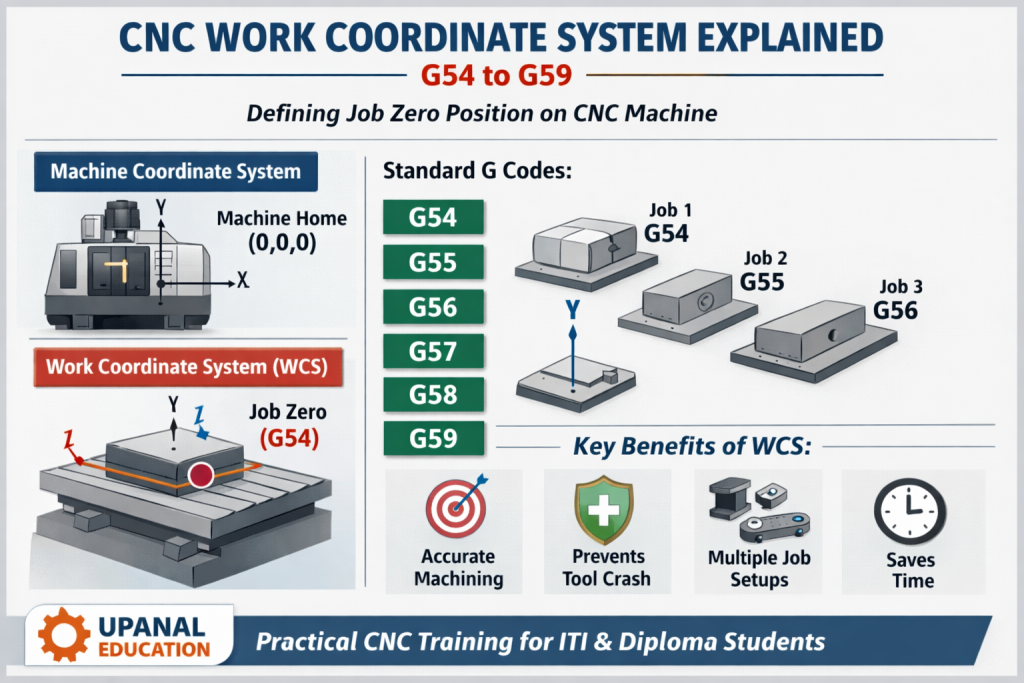
To achieve this, CNC machines use a Work Coordinate System (WCS).
Understanding WCS is very important for CNC operators and programmers, especially beginners.
This blog explains CNC Work Coordinate System (G54 to G59) in a simple and practical way.
What is Work Coordinate System (WCS)?
A Work Coordinate System defines the zero position of the job (workpiece).
It tells the CNC machine where the job is placed on the machine table.
👉 In simple words:
WCS = Job zero reference point
Without WCS, the machine cannot understand where to start machining.
Why Work Coordinate System is Important?
- Ensures accurate machining
- Prevents tool crash
- Helps in repeat production
- Allows machining of multiple jobs in one setup
- Saves setup time
Difference Between Machine Coordinate & Work Coordinate
| Feature | Machine Coordinate | Work Coordinate |
| Reference | Machine home position | Job zero position |
| Fixed or changeable | Fixed | Changeable |
| Set by | Manufacturer | Operator / Programmer |
| Used for | Machine movement | Machining operation |
Common Work Coordinate Systems (G Codes)
🔹 G54 – G59 Explained
CNC machines provide six standard work coordinate systems:
- G54 – First job reference
- G55 – Second job reference
- G56 – Third job reference
- G57 – Fourth job reference
- G58 – Fifth job reference
- G59 – Sixth job reference
Each G code represents a different job zero position.
When to Use Multiple Work Coordinates?
Multiple WCS is used when:
- More than one job is fixed on the table
- Multiple operations are done in single setup
- Production needs faster cycle time
Example:
- Job 1st → G54
- Job 2nd → G55
- Job 3rd → G56
How to Set Work Coordinate System?
Basic steps:
- Fix the job on machine table
- Take reference using edge finder / probe / tool touch method
- Set X, Y, Z values in G54 (or other G codes)
- Verify values before running program
⚠️ Always dry run before actual machining.
Work Coordinate System in CNC Turning vs Milling
CNC Turning
- Axes used: X and Z
- Job zero usually set at job face center
CNC Milling (VMC)
- Axes used: X, Y, Z
- Job zero can be set at:
- Corner of job
- Center of job
- Top surface
Common Mistakes Students Make
- Confusing machine zero with work zero
- Wrong Z zero setting
- Not updating WCS after job change
- Skipping dry run
- Selecting wrong G code (G54 instead of G55)
Work Coordinate System Training at Upanal Education
At Upanal Education, students learn:
- Practical WCS setting on CNC Turning & VMC
- Real-time job setup methods
- Industrial best practices
- Error-free programming approach
- Hands-on machine exposure
We focus on industry-required skills, not just theory.
Conclusion
The Work Coordinate System (G54 to G59) is the foundation of accurate CNC machining.
Every CNC operator and programmer must clearly understand how to set and use WCS to avoid errors and increase productivity.